> ## Documentation Index
> Fetch the complete documentation index at: https://docs.overlap.ai/llms.txt
> Use this file to discover all available pages before exploring further.
> Clean up filler words, stutters, silences, and punctuation in workflow outputs.
# Filler words
> Remove speech clutter and transcript punctuation before the workflow moves on to finishing or export.
The **Remove Filler Words** node is an **Editing** action node for cleaning up spoken content in a workflow. Use it after the workflow has a video or clips to process, and before any downstream node that should use the cleaned result.
### Schema
* **Input**: Video or clips from an earlier workflow node
* **Output**: Video/clips output with the selected cleanup options applied
## Add the node
Open **Workflows** from the left sidebar and click **New** to open the workflow builder.
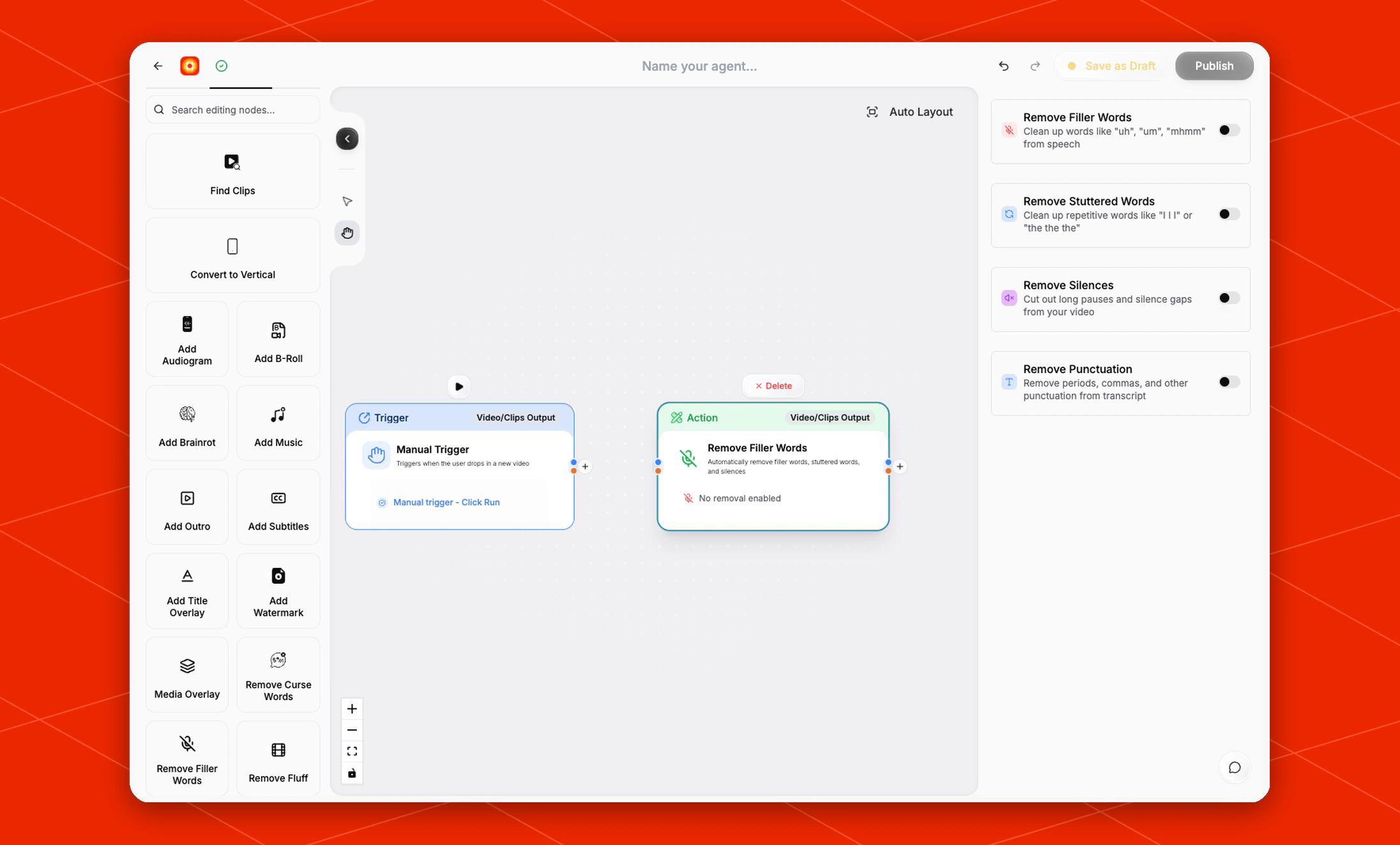
Add a trigger or source node first. When the builder moves to the **Editing** stage, choose **Remove Filler Words** from the left node panel. Overlap adds it as an action node on the canvas.
Click the **Remove Filler Words** node on the canvas whenever you need to reopen its settings on the right side.
 ## Choose what to remove
All cleanup options are off by default. Turn on only the passes you want this workflow to run.
* **Remove Filler Words**: Clean up words like `uh`, `um`, and `mhmm` from speech.
* **Remove Stuttered Words**: Clean up repetitive words like `I I I` or `the the the`.
* **Remove Silences**: Cut out long pauses and silence gaps from your video.
* **Remove Punctuation**: Remove periods, commas, and other punctuation from the transcript.
The node card shows **No removal enabled** until at least one cleanup option is turned on.
## Place it in the workflow
Place **Remove Filler Words** after the node that produces the video or clips you want to clean.
For a clip workflow, a common order is:
* **Find Clips** -> **Remove Filler Words** -> **Add Subtitles** -> export
For a manual cleanup workflow, you can place it directly after **Manual Trigger** and then continue into subtitles, reframing, branding, or export.
## Build the rest of the workflow
After cleanup is configured, continue with finishing nodes such as [Add Subtitles](/nodes/subtitles), [Reframe](/nodes/reframe), [Watermarks, Outros, etc.](/nodes/branding), or an export node. Click **Publish** when the workflow is ready to run.
## Choose what to remove
All cleanup options are off by default. Turn on only the passes you want this workflow to run.
* **Remove Filler Words**: Clean up words like `uh`, `um`, and `mhmm` from speech.
* **Remove Stuttered Words**: Clean up repetitive words like `I I I` or `the the the`.
* **Remove Silences**: Cut out long pauses and silence gaps from your video.
* **Remove Punctuation**: Remove periods, commas, and other punctuation from the transcript.
The node card shows **No removal enabled** until at least one cleanup option is turned on.
## Place it in the workflow
Place **Remove Filler Words** after the node that produces the video or clips you want to clean.
For a clip workflow, a common order is:
* **Find Clips** -> **Remove Filler Words** -> **Add Subtitles** -> export
For a manual cleanup workflow, you can place it directly after **Manual Trigger** and then continue into subtitles, reframing, branding, or export.
## Build the rest of the workflow
After cleanup is configured, continue with finishing nodes such as [Add Subtitles](/nodes/subtitles), [Reframe](/nodes/reframe), [Watermarks, Outros, etc.](/nodes/branding), or an export node. Click **Publish** when the workflow is ready to run.