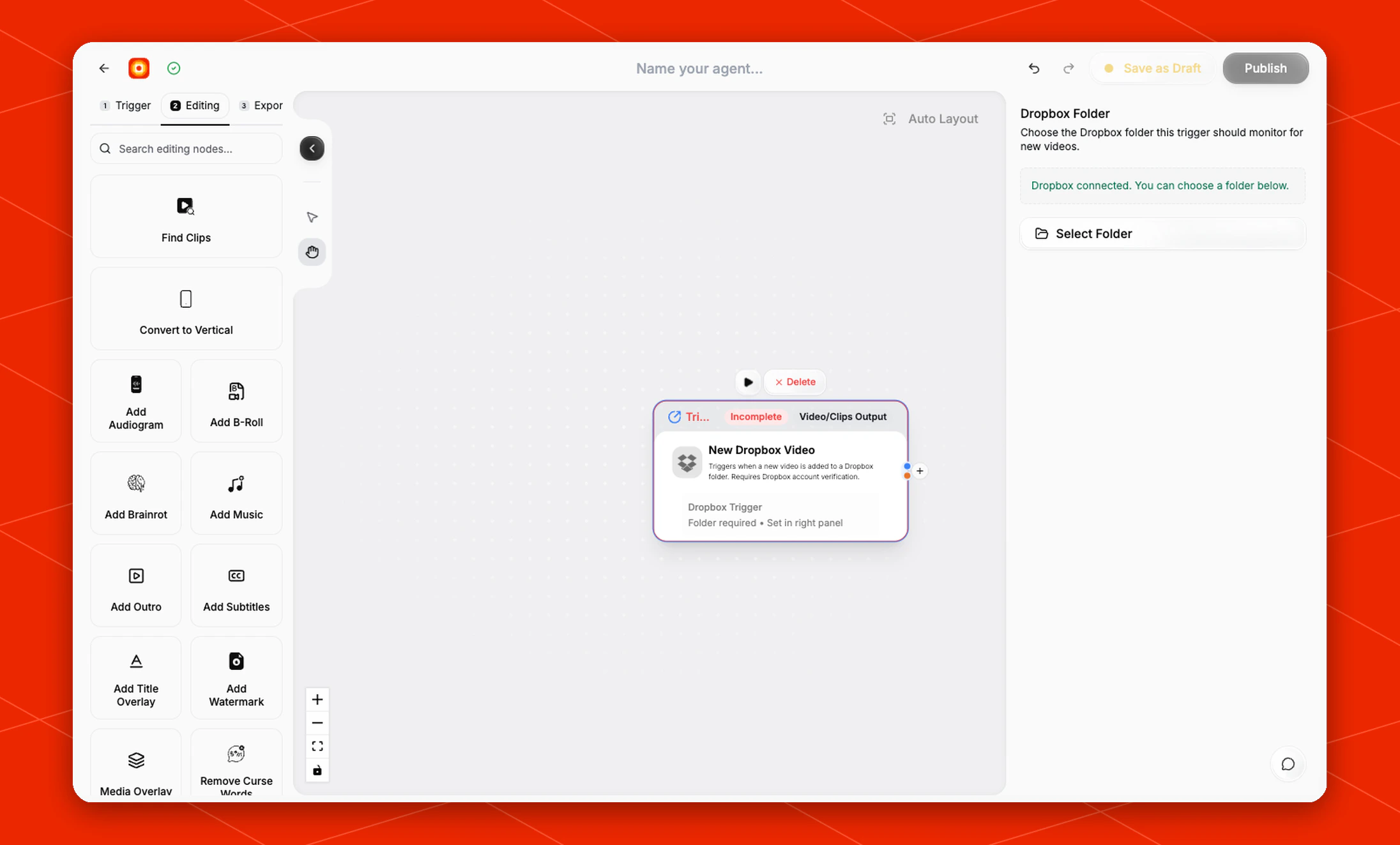
Start a workflow automatically when a new video is added to a monitored Dropbox folder.
The New Dropbox Video trigger is for workflows that should watch a Dropbox folder and send new videos into the rest of your workflow. Use it when a shared folder is where new source videos arrive. Dropbox account verification is required before Overlap can monitor folders.
ZIP archives aren’t supported. Add video or audio files directly to the
monitored folder instead. If Overlap detects a ZIP, it won’t start the
workflow and will add an error notification in the portal.
Schema
- Input: The Dropbox folder to monitor
- Output: The new Dropbox video that starts the workflow
Add the node
Open Workflows from the left sidebar and click New to open the workflow builder.
In the Trigger stage, choose New Dropbox Video. Overlap adds the trigger node to the canvas, selects it, and moves the left panel forward to Editing so you can continue building the workflow.
Click the New Dropbox Video node on the canvas whenever you need to reopen its settings on the right side.
Choose the Dropbox folder
In the right-side settings panel, use Dropbox Folder to choose the folder this trigger should monitor for new videos.
If Dropbox is already connected, the panel shows Dropbox connected. You can choose a folder below. Click Select Folder and choose the folder that should start the workflow when new videos are added.
Until a folder is selected, the node shows Incomplete and displays Folder required • Set in right panel on the canvas.
If the panel asks you to connect or verify Dropbox, complete that step first, then return to Select Folder.
Large source files
Full-length masters can be very large (for example, a 4K episode of 30 GB or more). Overlap reads files over 8 GB directly from Dropbox and converts them to a working copy before the rest of the workflow runs, so they don’t need to be exported smaller first. Expect these runs to spend extra time on that first step: an 80-minute 4K episode takes roughly 20–30 minutes.
If a large file can’t be converted, the run stops with an error that names the file size instead of continuing with the original file. Exporting at a lower bitrate (around 8–10 Mbps) makes runs faster. Dropbox traffic from these downloads counts toward your Dropbox account’s daily bandwidth limit.
Build the rest of the workflow
After the trigger is configured, continue in Editing with nodes such as Find Clips, Style Video, or Reframe. Finish with an export node, then click Publish when the workflow is ready to listen for new Dropbox videos.